
Future AI Guide

The Ultimate AI Resource Hub

Best AI Video Generator | AI STUDIO

Best AI Video Generator | AI STUDIO

AI Video Generator, Tex-to-Video, Generative Videos, Custom Avatar, 2,000+ Avatars, AI Dubbing with Translation, Text to Speech with 150+ Languages, and 7,000+ Video Templates — for HR Training, and YouTube Creators.

Trial Available
Best AI Video Generator | AI STUDIO

AIStudios – AI Avatar Video Creation, Virtual Presenters, and Scalable Content Production

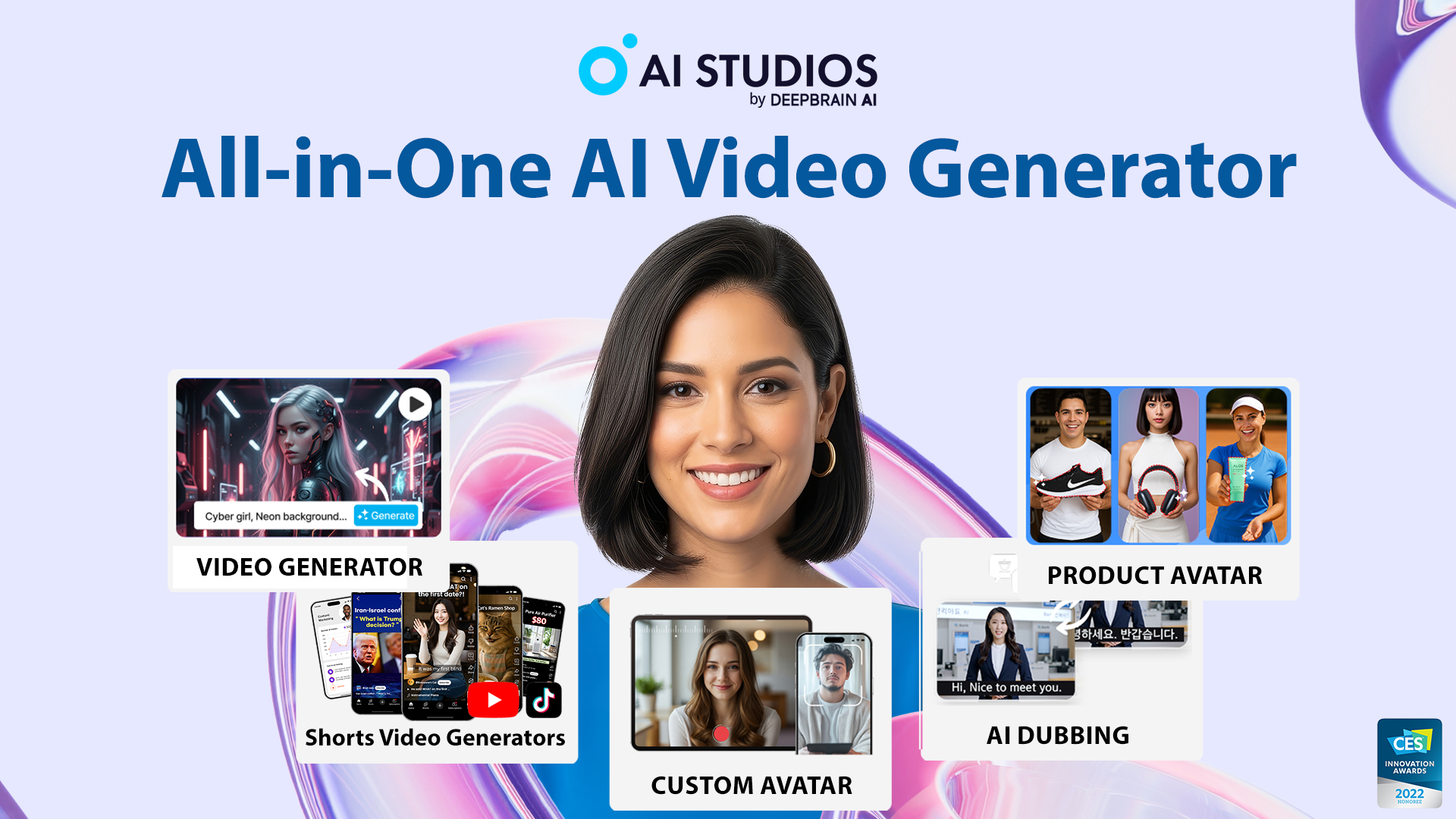
AIStudios was created to give businesses and creators a fast, affordable way to produce professional video content using AI avatars instead of traditional filming. Producing training videos, explainers, marketing messages, or onboarding content typically requires cameras, studios, actors, lighting setups, and post-production editing—making video one of the most time- and cost-intensive media formats.

AIStudios removes that burden entirely. Users simply type a script, choose a virtual presenter, select a scene, and generate a polished video. With support for multilingual output, realistic avatars, and brand customization, AIStudios enables teams to scale content production without hiring presenters or video crews.

Key Features

  • AI Avatars & Presenters: Human-like digital actors that can deliver scripts in multiple styles.
  • Text-to-Video Generation: Turn written scripts into full videos instantly.
  • Multilingual Voiceovers: 80+ languages and accents with natural, high-quality TTS.
  • Custom Avatar Creation: Build branded avatars for corporate or long-term use.
  • Templates & Scene Builder: Ready-made layouts for lessons, product demos, and company training.

Pros

  • Drastically faster and cheaper than traditional video production.
  • Highly realistic avatars suitable for professional environments.
  • Multilingual support enables global content deployment.
  • Simple interface requiring no editing or design skills.

Cons

  • Avatars may appear artificial in emotional or highly expressive contexts.
  • Requires strong scripts for best results.
  • Custom avatars cost extra.
  • Limited cinematic creativity compared to traditional filmmaking.

Pricing

AIStudios offers several tiers:

  • Free/Trial Plan
    Limited video generation credits and basic avatars.

  • Starter/Creator Plan
    More avatars, higher-quality rendering, longer video limits.

  • Professional Plan
    Custom branding tools, advanced avatars, priority processing.

  • Enterprise Plan
    Custom avatar creation, API access, large-scale video generation, and dedicated support.

Pricing varies based on video length, rendering quality, and avatar features.

Who Is Using This Tool?

  • Corporate training teams producing onboarding and compliance videos.
  • Educators developing lessons, tutorials, and e-learning modules.
  • Marketing teams creating promotional and product videos.
  • Customer success teams generating walkthroughs and guides.
  • SMBs and startups making high-quality content without hiring video staff.

AIStudios is especially useful for organizations needing repeatable, update-friendly videos.

Technical Details

Avatar Rendering Engine

AIStudios’ avatar system uses:

  • neural rendering
  • facial motion synthesis
  • lip-sync models
  • gesture mapping
  • emotional modulation controls

These generate realistic speaking performances based on the user’s script.

Text-to-Speech System

Supports:

  • 80+ languages
  • multiple voice styles
  • pitch and tone adjustment
  • clear pronunciation modeling

Custom Avatar Pipeline

Companies can create avatars through:

  • professional scanning
  • actor-based modeling
  • photoreal 3D reconstruction

Video Composition Tools

Includes:

  • slide synchronization
  • branded color schemes
  • scene transitions
  • background replacement
  • subtitle generation

The User Experience

Ease of Use

  • Type a script.
  • Choose an avatar and voice.
  • Select a layout or template.
  • Generate a complete video in minutes.

No video editing skills required.

Accessibility

  • Web-based interface.
  • Cloud rendering for fast processing.
  • Supports exporting in multiple formats including MP4.

Workflow

  1. Create a project inside AIStudios.
  2. Upload assets or select a template.
  3. Enter your script and choose a presenter.
  4. Customize formatting, colors, and visual layout.
  5. Generate and export the video.

Summary

AIStudios enables organizations to produce high-quality, scalable video content using AI avatars and text-to-video generation. It eliminates the need for filming equipment, actors, or complex editing, making it ideal for training, onboarding, tutorials, and corporate communication. Fast, efficient, and cost-effective, AIStudios empowers teams to create polished video content at scale.

Related Tools

  • Synthesia – AI presenter videos and multilingual production.
  • HeyGen – Video avatars and translation tools.
  • D-ID – Face animation and talking avatars.
  • Veed.io – Online video editing with AI.
  • Pictory – Script-to-video and summarization tools.